


emoeby
Provisional Member
-
Joined
-
Last visited
-
 emoeby reacted to a post in a topic:
Article: Reports: Twins Leaning Toward Falvey As Baseball Ops Chief
-
Any chance this is was a reaction to Target Field, to try to pull the ball and maybe more power?
-
Awesome. Well said.
-
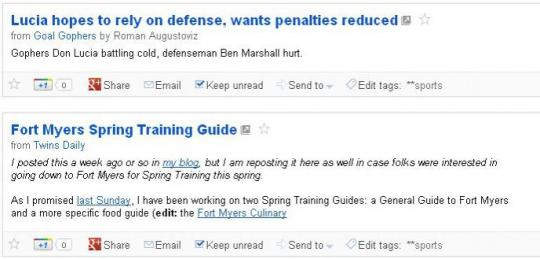
Yep, exactly. You all had full feeds as individual writers, but with Twins Daily, the feeds are all condensed, and that kinda stinks. And as for Authors on posts, here is an example (screenshot from Google Reader) Notice how the feed at the top has the post authors name, Roman Augustoviz, but the Twins Daily has no display of who wrote the post. That's a very important feature for a site that has as many authors as Twins Daily has. Twins Daily is going to be a great resource for excellent Twins content, but the design of the site, and the workings of the backend are amateur at best.
-
Love the site, congrats! Can we get full RSS feeds? And can you look into adding the post author name to the feed? I'd really like to see who wrote the post before opening it up and reading it. Thanks!

